Thanks to the programming skills of Dick, W3OA and Felipe, PY1NB, we now have a new production version of the Aggregator, the software that collects CW Skimmer or Skimmer Server spots and forwards them to the Reverse Beacon Network's server. This is much advanced over the beta versions that you may have been using (0.92b or 0.93b).
The new one (Version 1.4) is available for download here. It only takes about 5 minutes to get going. It offers several very significant new features, and we urge every RBN spot contributor to download and begin using it as soon as possible. If you encounter any bugs, please report them to w3oa@roadrunner.com; for operational questions, please write to me (n4zr@contesting.com).
In order to use the new Aggregator, you must be running the latest version of Skimmer or Skimmer Server (1.71 for Skimmer, 1.30 for SkimSrv). These are available free to registered users of either program, and can be downloaded from the DXAtlas web site.You must also be sure, if you are using CW Skimmer, to select "Allow SKIMMER commands" on the Telnet tab; SkimSrv allows these commands by default.
There is also one system requirement for the new Aggregator - you must have Microsoft .NET 4.0 installed on your computer. If you were running version .92b or .93b of Aggregator, or a growing number of other recent software applications, you already have this on your computer. You can get it here, and it takes only 5 minutes to download (on broadband) and install. This is the reason why the Aggregator is only 90 KB - and since it is increasingly a requirement for other software as well, we hope this won't be an obstacle for anyone.
All you need to do is save the new Aggregator somewhere, and it is ready to go. For users of Windows Vista and Windows 7, you will need to put the new Aggregator somewhere where the operating system will allow it to write an .ini file. That means putting it almost anywhere but the Program Files directory - many of us use C:\Ham Radio as an alternate location, to avoid these issues.
Some security software (Norton Security's SONAR, for one) will try to block Aggregator from running, and even removing it from the installed location. These packages make their "decisions" based on what they regard as "risky software behavior." We can't really avoid getting them stirred up, given the way that Aggregator operates. If you run into this, you will need to tell the busybodies that you know best; all these security software packages have provision for reversing their "decisions." With SONAR, you get to it through the “Details” link, and then by “Options” – you can tell it to ignore the program from then on.
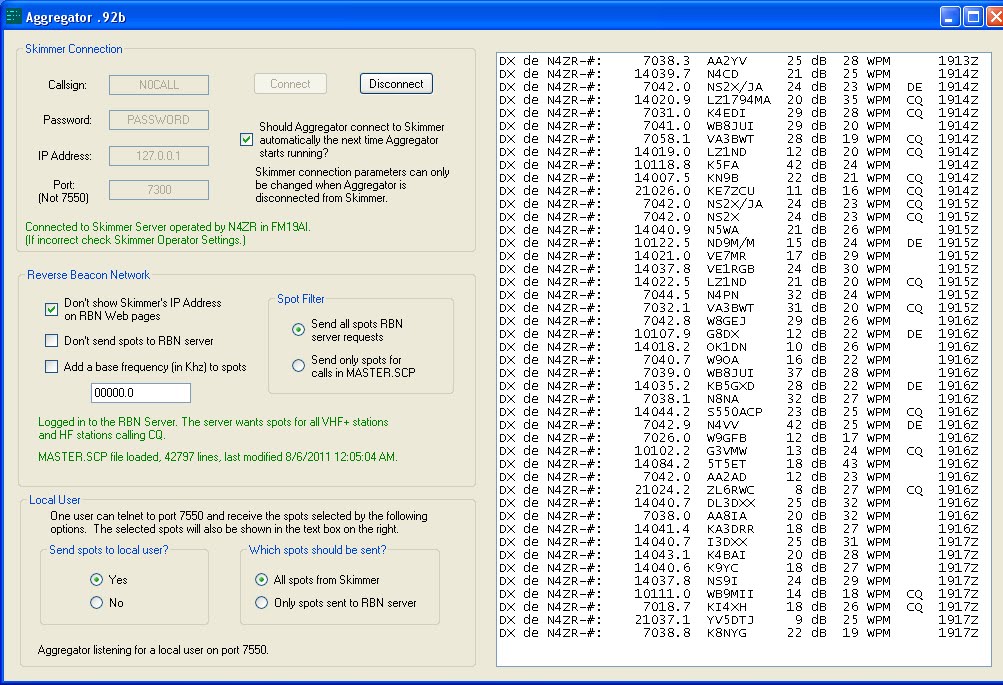
Here is a screenshot of the new Aggregator - probably the best way to explain its features.
The biggest thing you'll notice is that the new Aggregator is a "real" Windows program, which means that you do all the setup on a single screen, rather than having to set command-line options. Despite that, it is very small, uses essentially no CPU power, makes no changes to the registry, and does not have to be installed.
Some security software (Norton Security's SONAR, for one) will try to block Aggregator from running, and even removing it from the installed location. These packages make their "decisions" based on what they regard as "risky software behavior." We can't really avoid getting them stirred up, given the way that Aggregator operates. If you run into this, you will need to tell the busybodies that you know best; all these security software packages have provision for reversing their "decisions." With SONAR, you get to it through the “Details” link, and then by “Options” – you can tell it to ignore the program from then on.
Here is a screenshot of the new Aggregator - probably the best way to explain its features.
The biggest thing you'll notice is that the new Aggregator is a "real" Windows program, which means that you do all the setup on a single screen, rather than having to set command-line options. Despite that, it is very small, uses essentially no CPU power, makes no changes to the registry, and does not have to be installed.

The upper panel is the initial setup

The default settings should normally work for your installation. If you have not set up your Skimmer or SkimSrv to require a username or password for access to its Telnet server, then you don’t need to fill in either one. The IP address is the address of the computer Skimmer or SkimSrv is on. If Aggregator is on the same computer, then the correct fill-in is 127.0.0.1. Otherwise, fill in the internal IP address of the Skimmer/SkimSrv computer. The port number must correspond to the one you have set on the Telnet tab of Skimmer or SkimSrv.
If you lose your connection to Skimmer for any reason, the green message at the bottom of the pane will change to red to alert you.
The next pane down controls what spots are sent to the Reverse Beacon Network. This is where things get really interesting.
The next pane down controls what spots are sent to the Reverse Beacon Network. This is where things get really interesting.

The left-hand column is pretty self-explanatory, except for the last item. The “Add a base frequency” section is intended only for transverter users. Do not attempt to use it to correct your frequency calibration; instead, refer to this entry in the RBN blog for a quick and easy way to calibrate your receiver within 50 Hz.
In the right-hand column, the new Aggregator provides the functionality of the "Paranoid" validation setting in CW Skimmer, which some users of SkimSrv may have been missing. If this option is selected, only spots that match calls in a master file are forwarded to the RBN. The Aggregator uses the text version of the widely-used master.dta file, called master.scp. To download it, click the button in the SuperCheckPartial pane in the right column of the Aggregator.
“Paranoid” validation is a two-edged sword. Because the latest master file is only compiled before major contests, it is virtually certain to omit new special calls and DXpeditions. You’ll have to decide for yourself whether you want to exclude them from the spots you send. Experience indicates that either Normal or Aggressive validation, set in your Skimmer or SkimSrv, provides quite adequate protection against busted spots.
At the bottom of the pane you’ll see confirmation that you’re connected to the RBN. Also included, and new in this version, the server can request only certain spots, and exclude bands of frequencies. As shown here, beacon spots will now be forwarded to the RBN, and spots in certain frequency bands will not. The idea is to avoid busted spots by excluding the main RTTY frequencies on the higher bands. This is a bit of an experiment, because in major contests the boundaries are often ignored. For that reason, any excluded frequency bands will likely be dropped from the server’s instructions during contests. You’ll note that in the full-screen image above there are no excluded frequencies shown
Once you are using the new Aggregator, please uncheck the "Post Only CQ Spots" option on the Telnet tab of your Skimmer or SkimSrv. That will send everything to the Aggregator, and it will decide which spots to forward. This will facilitate experimentation with new features, while not loading the RBN server with unwanted spots, and it’s the only way beacon spots can get to the RBN.
Again, the green text at the bottom of the pane tells you that all is well, and changes if there is something that needs to be corrected.
Moving on to the bottom left pane …
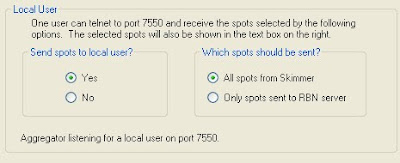
This is an added feature that some users will find useful. It lets you feed spots locally from the Aggregator to a logging program, and choose whether you want to see everything locally or only spots that have passed through the Aggregator's filters and been sent to the RBN. Again, the text at the bottom tells you the status of this feature - when a local "user" is connected, the text changes to green and reports that the connection has been made.
The top right pane of the Aggregator window is another new feature, to be used for messages from the server to Skimmer ops. It might be used, for example, to advise that a new Aggregator has been released, or a new blog article, or to provide information to help correct some issue that has arisen. It will be worth checking here periodically to see if there’s anything new.
Once you are using the new Aggregator, please uncheck the "Post Only CQ Spots" option on the Telnet tab of your Skimmer or SkimSrv. That will send everything to the Aggregator, and it will decide which spots to forward. This will facilitate experimentation with new features, while not loading the RBN server with unwanted spots, and it’s the only way beacon spots can get to the RBN.
Again, the green text at the bottom of the pane tells you that all is well, and changes if there is something that needs to be corrected.
Moving on to the bottom left pane …

This is an added feature that some users will find useful. It lets you feed spots locally from the Aggregator to a logging program, and choose whether you want to see everything locally or only spots that have passed through the Aggregator's filters and been sent to the RBN. Again, the text at the bottom tells you the status of this feature - when a local "user" is connected, the text changes to green and reports that the connection has been made.
The top right pane of the Aggregator window is another new feature, to be used for messages from the server to Skimmer ops. It might be used, for example, to advise that a new Aggregator has been released, or a new blog article, or to provide information to help correct some issue that has arisen. It will be worth checking here periodically to see if there’s anything new.

The next pane tells you whether your master.scp file is the same one available from the RBN server, and provides a Download button that is greyed out unless a newer one is available.

And finally, the last pane.

It gives you all the information collected on each spot. Note, though, that it displays the spots as they are provided by Aggregator to the local Telnet port. In this case, I have SkimSrv sending all spots to the Aggregator, be they CQ, DE, or undetermined. The program will take care of sending only those spots that the server wants.
So that's the story. We hope you will all thank Dick and Felipe for their contributions, by downloading and using the new Aggregator.
73, Pete N4ZR
So that's the story. We hope you will all thank Dick and Felipe for their contributions, by downloading and using the new Aggregator.
73, Pete N4ZR